lab0
2.1 Fetch a Web Page
浏览器打开 http://cs144.keithw.org/hello,这里是确保你的机器能连接到网站
在环境中使用 telnet cs144.keithw.org http 命令进入telnet,telnet会向网站发送请求,现在需要发送http header
逐行输入:(注意最后需要两次回车表示结尾
GET /hello HTTP/1.1
Host: cs144.keithw.org
Connection: close
这时你应该可以看到之前出现在浏览器中的消息
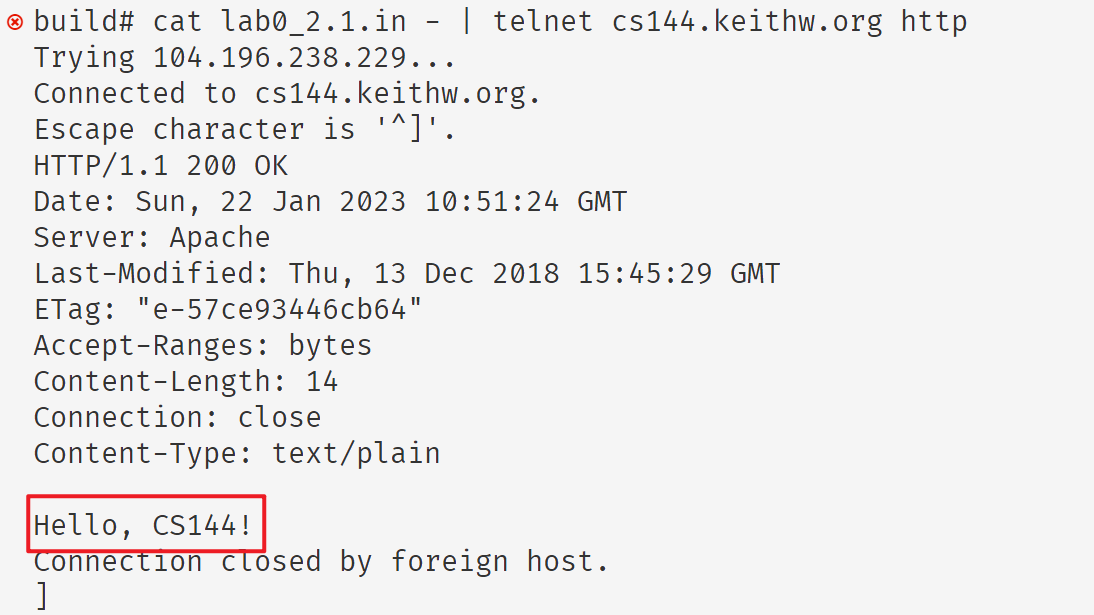
如果手速过慢会失败,这时可以将header保存为文件,使用管道传输给telnet
cat lab0_2.1.in - | telnet cs144.keithw.org http # 从 lab0_2.1.in 文件中读取数据并自动输入到telnetwebget
void get_URL(const string &host, const string &path) {
    // Your code here.

    // You will need to connect to the "http" service on
    const Address addr(host, "http");  // ref: https://cs144.github.io/doc/lab0/class_address.html
    // create a tcp socket and connect to the address
    TCPSocket sock;
    sock.connect(addr);

    // 初始化要传输的消息
    // then request the URL path given in the "path" string.
    string msg = "GET " + path + " HTTP/1.1\r\n";  // 注意必须以 \r\n 结尾
    // the computer whose name is in the "host" string,
    msg += "Host: " + host + "\r\n";
    msg += "Connection: closed\r\n\r\n";

    sock.write(msg);
    sock.shutdown(SHUT_WR);  // 读结束, SHUT_RDWR 表示读写都结束

    // 开始读取信息
    // Then you'll need to print out everything the server sends back,
    // (not just one call to read() -- everything) until you reach
    // the "eof" (end of file).
    while (!sock.eof()) {
        cout << sock.read();
    }

    sock.close();

    cerr << "Function called: get_URL(" << host << ", " << path << ").\n";
    cerr << "Warning: get_URL() has not been implemented yet.\n";
}